
How to reinstate a deleted user account
A deleted Synthetix Cloud user account must be reinstated by an administrator before the user can sign in again.
Reinstate the account
Contact an administrator who has access to the Admin section of your organisation’s Synthetix Cloud account. The administrator should:
- Open Admin.
- Go to General > Users.
- Set the Status filter to Deleted.
- Search for the user by their name, username or email address.
- Select the user account to open its details.
- Select Reinstate.
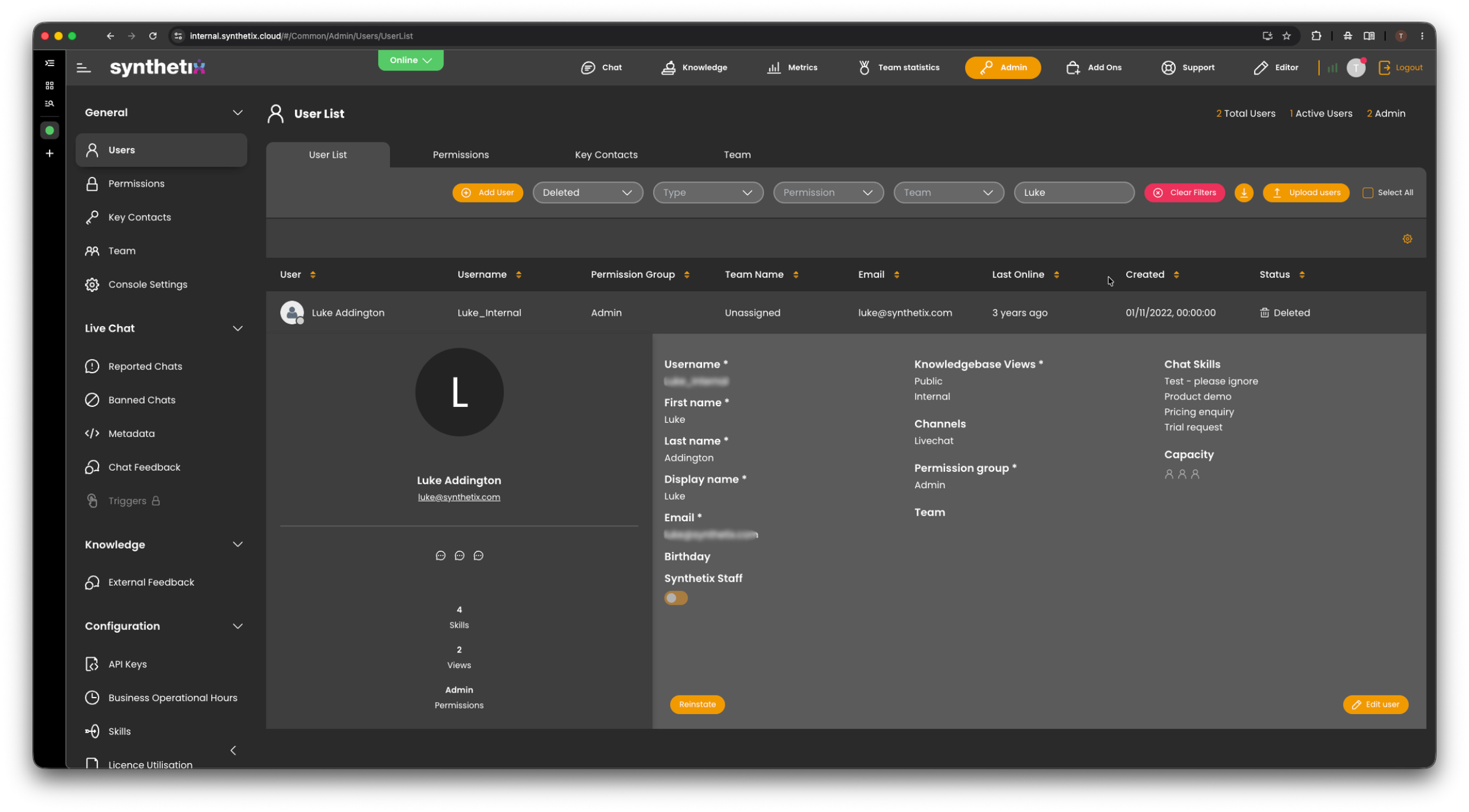
Once the account has been reinstated, the user can sign in to Synthetix Cloud again.
Why was the account deleted?
A user account may be deleted for either of the following reasons:
- Inactivity: After 12 months without signing in, the user receives an email warning them that their account is inactive. If they do not sign in, the account is deleted after 13 months of inactivity.
- Manual deletion: A Synthetix Cloud administrator may have manually deleted the account.
An administrator can restore the account by following the steps above.
